
Built for 1–5 truck independent haulers
Run your trash routes and dumpster rentals from one place
Dispatch, recurring billing, online dumpster booking, a customer portal and an offline driver app, built for haulers who do residential pickup, roll-off rentals, or both.
No credit card required · Cancel any time · From $49/month
Real screens · sample hauler data
- Trash routes and dumpster rentals together
- Paid into your own Stripe or Square account
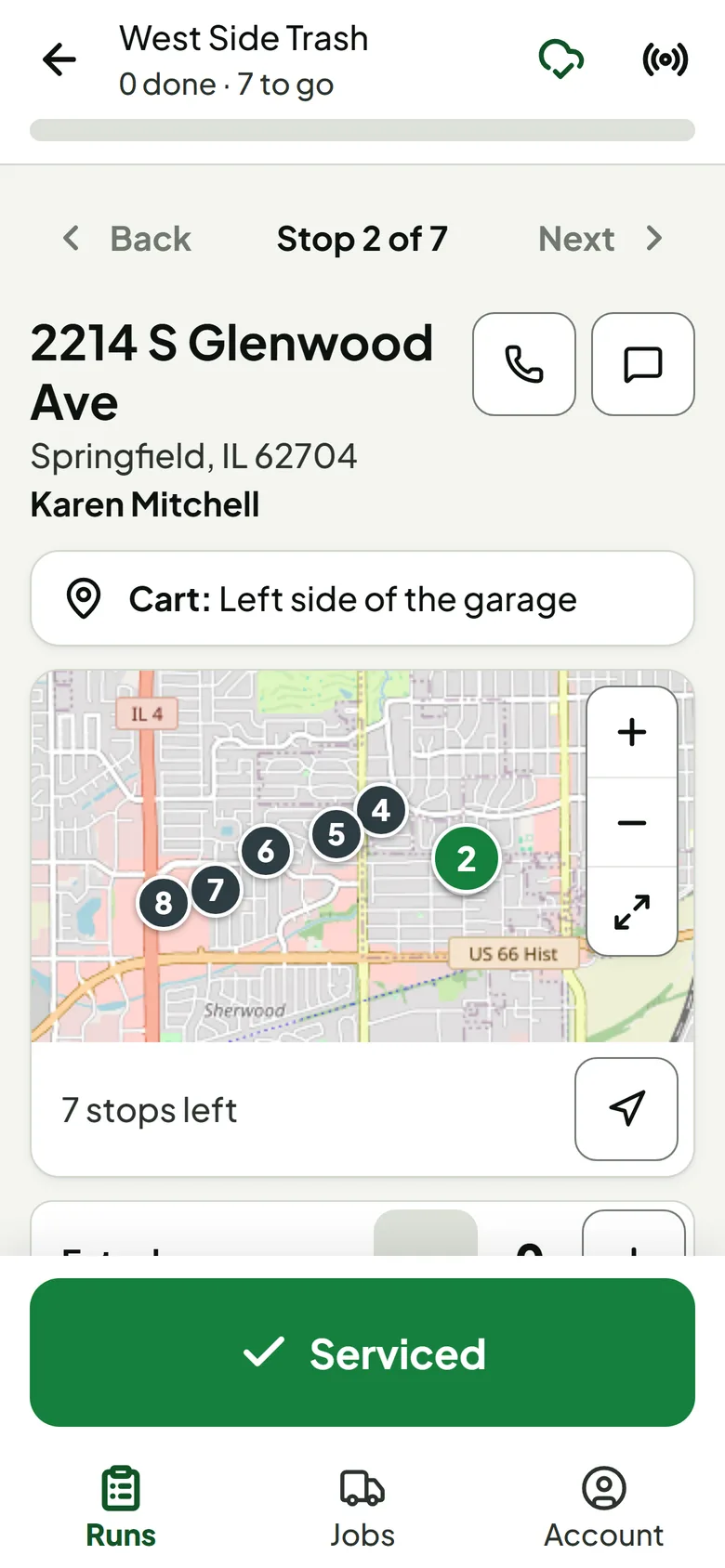
- Driver app works offline
- Card numbers stay with Stripe or Square
Two operations, one system
Residential pickup or roll-off rentals? Run both from one place.
One login, one customer list and one dispatch board for both. Professional and Business include both; on Starter you pick one.
Residential collection
- Recurring pickup routes, with daily runs made from them
- Rate plans for trash, recycling, yard waste and bulk
- Online sign-up that checks the address is in your area
- Monthly, quarterly or annual billing with autopay
- Skips, vacation holds and missed-pickup requests
Dumpster rentals
- Online booking priced by your service zones
- Fleet tracked unit by unit, availability by date
- Delivery, pickup and swap jobs on the dispatch board
- Quotes your customer confirms and pays online
- Weight overage worked out from each load
See it in action
The screens you'd use every day
Real Trash Tools screens, shown with a sample hauler's data.
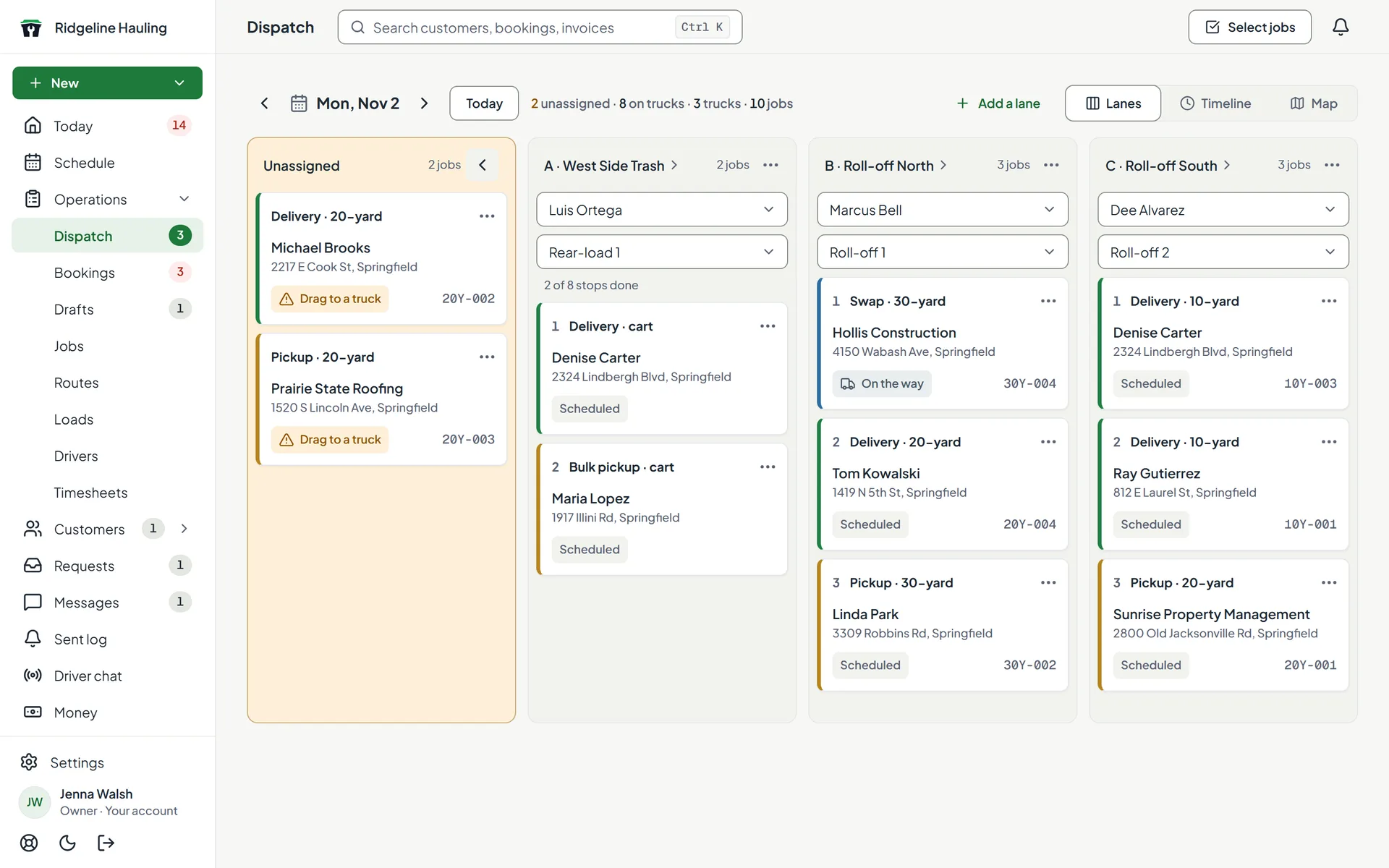
Every job for the day on one board
Cart deliveries, bulk pickups and dumpster drop-offs, pickups and swaps sit together, one lane per truck. Drag a job onto a truck to assign it.
- Lanes, timeline and map views
- Unassigned jobs stand out until they're on a truck
- With one driver, new jobs are assigned to them for you
Want to click around a customer-facing site? Preview a sample booking site (a fictional dumpster company, no signup)
How a job moves
What happens on its own, and what's still yours to do
From the first booking to the payment, here's who does each step.
A dumpster rental
- 1Customer
Books a size and dates on your website
- 2Automatic
Address checked against your zones, dates against your fleet
- 3Automatic
Payment taken, or held until you approve, if you choose
- 4Automatic
Delivery and pickup jobs created
- 5You
Put the jobs on a truck (automatic if you have one driver)
- 6Driver
Drops off and picks up; the load's weight is recorded
- 7Automatic
Any weight overage is worked out for you to send
A new trash customer
- 1Customer
Signs up on your website
- 2Automatic
Address checked against your service area
- 3You
Approve the sign-up, or let sign-ups start right away
- 4Automatic
Added to a route, if you've turned that on for it
- 5You
Schedule the cart delivery
- 6Driver
Works the route from the app, with or without signal
- 7Automatic
Invoices drafted when due; autopay charges when they're sent
Switching
Switching shouldn't be the hard part
Running on spreadsheets or another system? You can keep billing the old way while you move over.
Step 1
Set up with the guided steps
Your business, service area, dumpster sizes or rate plans, trucks, drivers, routes, payments and website, in that order. You can stop and come back.
Step 2
Bring your trash customers over
Import residential customers from a CSV file, up to 1,000 rows at a time. Rows that match a rate plan start as active subscriptions, so set those up first. Dumpster customers are added as they book.
Step 3
Connect payments and share your link
Connect your own Stripe account (Square also works for dumpster booking checkout), then send customers to your new booking or sign-up page.
Stuck on something? Email hello@trash-tools.com.
Simple pricing
One flat monthly price. Stops aren't metered.
Pick the plan that fits your trucks and services. Save about 15% with annual billing.
Starter
Best for 1–2 trucks · No stop limit
For owner-operators starting out.
- Routes or dumpsters (pick one)
- Customer database
- Driver app that works offline
- Online invoicing & bank autopay
- Customer self-service portal
- Email notifications
- Your website with online signup or booking
Professional
Best for 2–4 trucks · No stop limit
Grow from one truck to a small fleet.
- Everything in Starter
- Routes and dumpsters (both)
- SMS notifications
- Suggested stop order for routes
- Container & inventory tracking
Business
Best for 4–5 trucks · No stop limit
For established haulers ready to scale.
- Everything in Professional
- Your own domain (yourcompany.com)
- Revenue, route & customer reports
- Custom service forms & quotes
- Priority support
Every plan starts with a 14-day free trial. Truck counts are a guide, not a limit, and stops are never capped or metered. Running more than five trucks? Talk to us →
Questions
Frequently asked
Creating your account takes a few minutes, with no installation and no credit card. Before you take real customers, set your service area and pricing, connect your own Stripe or Square account, then share your signup or booking link. How long that takes depends on your setup.
Yes. Trash Tools runs residential trash and dumpster rentals in one system. On Starter you pick one: residential routes or dumpster rentals. Professional and Business include both, in the same dashboard.
No. You can add customers by hand, or import residential customers from a CSV file, up to 1,000 rows at a time. An imported customer whose row matches one of your rate plans starts as an active subscription, so set up your rate plans before you import. You can keep running your old billing while you move over.
Yes. You can create different rate plans per service type — trash, recycling, yard waste, or bulk pickup. Each plan can have its own pricing, cart sizes, and billing cycle.
Cards, and for invoices and autopay, bank transfer (ACH). Payments go through your own Stripe account (Square also works for dumpster booking checkout), so you pay that processor's rates. Stripe's standard US pricing lists ACH at 0.8% capped at $5 and cards at 2.9% + 30¢. Autopay charges when each invoice goes out.
Yes. The driver app downloads the whole route to the phone before the driver leaves the yard, so it keeps working with no cell signal. Each stop saves the GPS location and photos, and everything uploads automatically once signal comes back.
Add a plan to keep going. If you don't, your office dashboard locks to the Subscription page until you do. Your customer website, customer portal and driver app keep working, so your customers aren't affected.
Every plan includes a website for your customers at yourcompany.trash-tools.com. On a paid Business plan you can also point your own domain (e.g., summitwaste.com) at it.
You pay a flat monthly (or annual) price for your plan. Stops aren't capped or metered, and the truck counts on each plan are a guide, not a limit. Trash Tools doesn't add its own fee to your customers' payments; you pay only your processor's rates.
No contracts. Cancel any time from the Subscription page in your dashboard — plan changes, receipts, and cancellation are all self-serve. You get a 14-day free trial to make sure it's the right fit — no credit card required to start.
Still have questions? Email us →
Try it with your own routes and dumpsters
Signups, routes, billing, dispatch, and dumpster bookings in one place. Free for 14 days, no card.
Start your free 14-day trialNot ready? Preview a sample booking site